
Nikolay Stefanov

Case study, self-initiated

Designing calm in a noisy world.

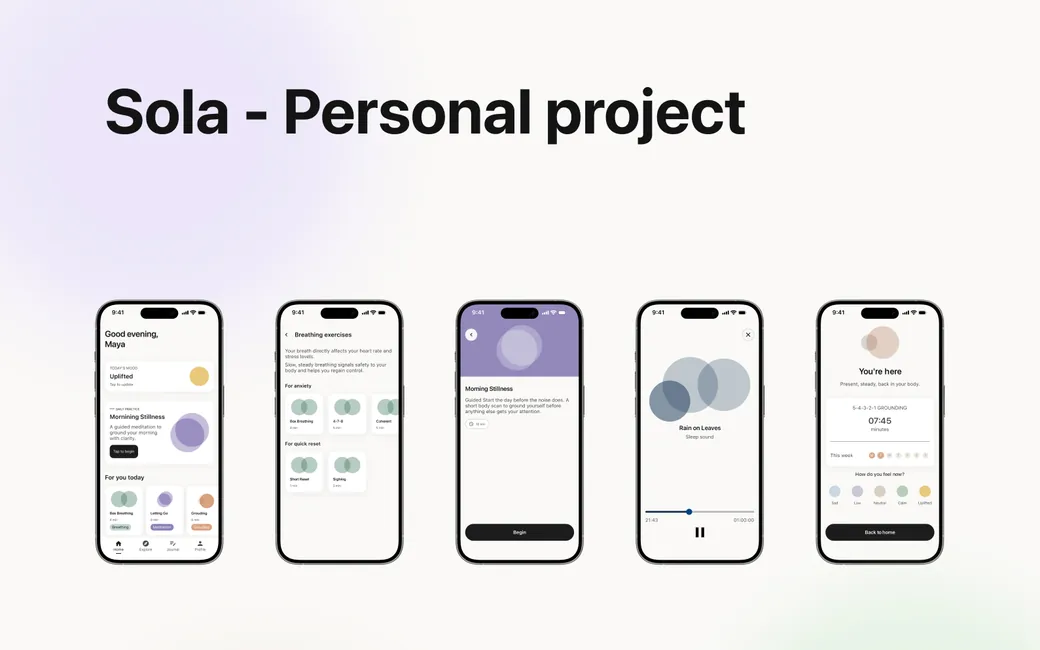
Sola is a minimalist iOS wellness app for people living with everyday anxiety. Built on one belief: support should feel like a sanctuary, never a sales funnel.

Project
Sola
My role
UX/UI Designer
Timeline
2026
Tools
Figma

01 The problem

People reach out for help - and get sold to instead.

The tools meant to calm people down are the ones adding to the noise. That gap between the promise and the experience is what Sola exists to close.

  • Cognitive overload

    An interface that overwhelms the moment.

    Too many options, no obvious starting point, and feeds full of celebrity content. An anxious user opens the app and freezes - the screen itself becomes another decision to manage.

  • Broken trust

    Core relief behind a paywall.

    Basic breathing exercises and mood logging sit locked behind a subscription. The user came for a free moment of calm and instead hits a wall - so they leave, and rarely come back.

  • Pressure tactics

    Subscription prompts that push, not ask.

    Upsell prompts surface on nearly every tap - countdown timers, guilt-worded buttons. It manufactures urgency, the exact opposite of what the moment calls for.

02 Research

I started by studying the apps people already left.

A competitive teardown of three leading wellness apps, cross-referenced with Reddit threads, WHO guidance, and published clinical data. Not just what they look like - where exactly they lose people.

  • Calm

    Paywall

    The polished giant. Lifestyle-led, heavy paywall.

    1. 1Open the appA dense home feed of featured photography and named celebrity content, no obvious entry point for a first-timer.
    2. 2Try to startMost taps lead to a locked session before a single calming moment is delivered.
    3. 3Free tier stallsWhat stays free is shallow, not enough to build a daily habit on.
  • Headspace

    Structure

    The structured course. Friendly, rigid, locked.

    1. 1Pick a courseSessions are bundled into multi-day courses. The format pre-commits the user before a single positive moment.
    2. 2Listen throughSessions feel long and inflexible. Ten minutes is a commitment many anxious users can't make right then.
    3. 3Hit the paywallAlmost all content gated. The dim “maybe later” link is a small but telling dark pattern.
  • Stoic

    Closest

    The journaling tool. Sharp focus, utilitarian feel.

    1. 1Log mood firstMood tracking is core, not optional. A strong opening move, though the tone reads more spreadsheet than sanctuary.
    2. 2Journal promptA focused writing flow with real philosophy framing. The flow is strong; typing-only is the friction.
    3. 3Review patternsStrong analytics, but the UI feels utilitarian rather than calming. Useful, less inviting as a daily ritual.

The number that suprised me

Across published studies and self-reports, real-world session length is consistently far shorter than what these apps are built around.

  • ~6 minAverage daily use in a Calm clinical trial
  • ~8 minSelf-reported average session length on Reddit
  • ~26 minAverage daily use in a large Headspace study

What the research told me: five truths I designed around.

  1. 1 Help first, trust later. A paywall at the point of need reads as betrayal. The apps that lead with free value earn the right to ask for money later.
  2. 2 Tracking can become a burden. Mandatory mood logging breeds guilt. Flattening a whole day into one emotion can make people feel less understood, not more.
  3. 3 Micro beats marathon. Most engagement is 5-8 minutes. Short complete sessions build daily habits better than long programs.
  4. 4 Visual calm is real calm. A cluttered UI physically raises tension. The interface itself is part of the treatment, or part of the problem.
  5. 5 Build on what works. Breathing, grounding, journaling, movement - the methods are proven. The job is removing friction around them.

03 The persona

This is Maya.

Built from the research, not invented to fit it. Maya is a composite of the people Sola is for - capable young professionals carrying more pressure than support.

Portrait of the persona used in the case study.

Maya Ivanova

Software Developer, 25

Location
Sofia, Bulgaria
Status
Single
Education
Software Engineer
Tech comfort
High
  • Anxiety
  • Burnout risk
  • Work stress
  • Poor sleep
  • Social pressure

Maya writes code for a fast-moving product team. She is good at her job, which is part of the problem. The deadlines keep coming, the standup keeps asking, and the open-plan office never really goes quiet. She gets home wired, not tired. Sleep comes late. She has tried meditation apps before, but they asked her to commit to a 10-day course or buy a subscription before she'd felt anything work. So they sit unopened on her phone.

Her goals

  • Bring daily stress and anxiety down to a manageable level
  • Make room for sport and a real social life
  • Find a sustainable work-life balance
  • Feel calm, steady, and in control of her day

Her challenges

  • Burnout and constant deadline pressure
  • Holding on to motivation week after week
  • Social situations and the expectations around them

What she needs

  • Quick, low-effort techniques that actually fit her day
  • Better quality of sleep
  • A sense of social support and connection

What irritates her

  • Apps that nag, upsell, or guilt-trip
  • Cluttered screens that demand decisions
  • The feeling of being a data point, not a person

04 Storyboard

A moment in Maya's day.

Before designing a single screen, I mapped the real-world arc Sola has to fit inside - six frames, from the spike of anxiety to the quiet that follows.

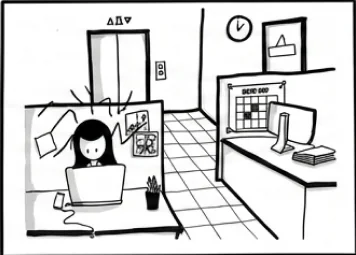
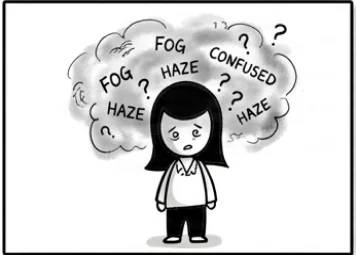
  • Frame one: a woman surrounded by a cloud of anxious words. The spike A wave of anxiety hits Maya mid-afternoon - chest tight, thoughts racing, no warning.
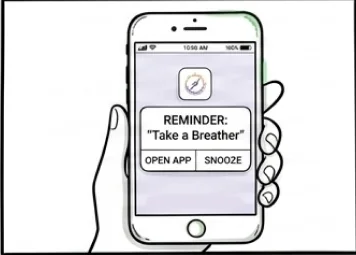
  • Frame two: a hand holding a phone showing a reminder to take a breather. Reaching out She reaches for her phone and opens Sola - hoping for relief, not another task.
  • Frame three: the same woman breathing at her desk in the office. A breath at her desk A guided breathing exercise runs in under two minutes - short enough to fit between tasks.
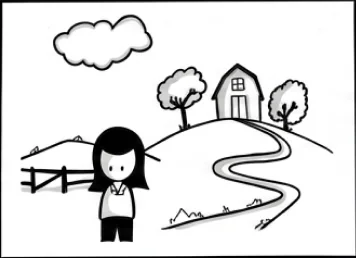
  • Frame four: the woman walking outside on a path with trees. A walk outside Later, a grounding prompt nudges her outdoors - movement and air, away from the screen.
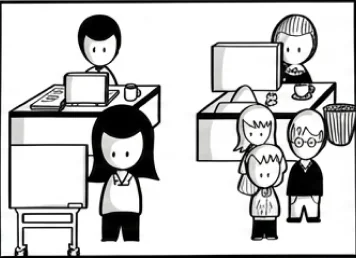
  • Frame five: the open-plan office full of colleagues and noise. Back in the open office The noise returns - colleagues, calls, pings - but she has a tool to step out for a minute.
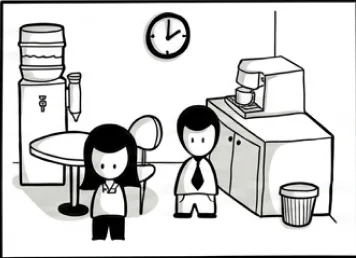
  • Frame six: the woman at the end of the day by the water cooler, calmer. The day ends lighter A quick evening check-in closes the loop - she logs how she feels and heads home calmer.

Using SAP AppHaus toolkit.

How might we

How might we help Maya ease her anxiety with quick, accessible practices, without adding more pressure, clutter, or cost to a day that's already full?

05 User flow and architecture

Mapping every screen into one calm path.

The information architecture, rebuilt around the new screens. Onboarding gets the user to value fast; from there, five tabs hold everything Sola does - no maze, no dead ends.

Entry - onboarding

  • 01

    Quick questionnaire

    Pick what's closest to you: what's driving the anxiety, what tends to help.

  • 02

    Personalized plan

    Sola reads the answers and lines up the practices that fit you.

  • 03

    Create account

    Asked only now, once there's something worth saving.

  • 04

    Enter Sola

    Land on Home, already tailored to the answers.

Entry - onboarding

  • Home

    Mood check-in, today's focus, quick relief.

  • Explore

    Browse practices by category, no noise.

  • Journal

    Free writing, voice input, gentle mood tags.

  • Home

    Progress, streaks, settings, calm by default.

06 Design principles

Three rules Sola never breaks.

Every screen had to answer to these. When a decision got hard, I came back here.

  • Principle 1

    Help is always free.

    Breathing, grounding and journaling stay free, forever. Trust is earned by being useful first - not by locking the door and asking for a key.

  • Principle 2

    Micro by default.

    Sessions run 1-5 minutes. Short enough to slip into any day, complete enough to leave the user genuinely calmer than they opened it.

  • Principle 3

    Gentle, never pushy.

    Reminders read like a friend checking in, not a product fighting churn. No countdowns, no guilt, no dark patterns - anywhere.

07 Key decisions

Where the research turned into a screen.

How do users actually want to journal?

Research showed logging itself feels like pressure - the harder it is to start, the less people do it. The question was whether to make typing better, or remove typing as the default entirely.

Chosen

Polished text journal

Pros

  • Familiar interaction that feels natural and approachable
  • Easy to search, edit, organize and revisit over time
  • Encourages reflection by helping users structure thoughts

Cons

  • Requires more effort than simply speaking
  • Some may struggle to find words in emotional moments

Verdict: Chosen as the primary journaling experience. Text provides clarity, privacy and long-term value, a more sustainable foundation for mindful reflection.
Discarded

Voice-first journal

Pros

  • Fastest way to capture thoughts and emotions
  • Reduces friction when users need to vent immediately
  • Preserves emotional tone and nuance

Cons

  • Hard to use in workplaces or public spaces
  • Transcription errors can change meaning

Verdict: Discarded as primary. Voice stays a valuable secondary feature, but its privacy limits make it less reliable day to day.

What happens when the app opens for the first time?

Research was blunt: users want help before they want a tour. Most onboarding flows take 60-120 seconds before delivering a single moment of value.

Chosen

Mood check-in first

Pros

  • User reaches a useful screen in under 30 seconds
  • The check-in itself is already a moment of pause
  • Routes straight to a relevant practice

Cons

  • Skips the chance to explain features upfront
  • Requires the rest of the UI to be self-explanatory

Verdict: Chosen: features earn discovery through use, not through a tutorial wall.

Discarded

Standard tutorial

Pros

  • Teaches features the user will need later
  • Higher chance the user discovers everything
  • Predictable, conventional pattern

Cons

  • Many users skip it, then feel lost later
  • Treats the app as the destination, not a tool

Verdict: Wrong moment. The first 30 seconds belong to relief, not orientation.

08 Usability testing

Then I put it in front of real people.

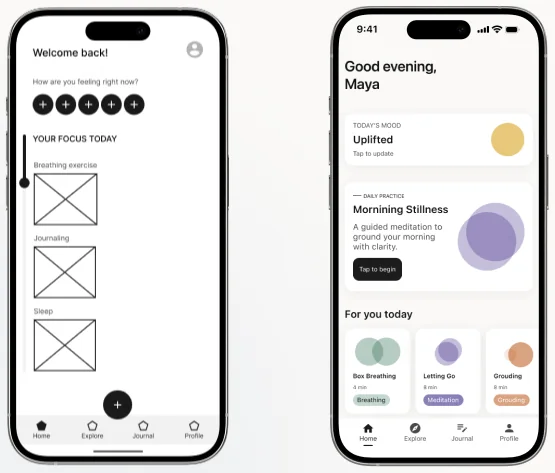
Four issues showed up again and again. Here are two of them - before and after the fix.

Issue 1 - orientation

The home screen had no clear entry point.

“I'm on the home screen, but I don't know what to do first.”

Test participant, round 1

The fix: a single mood check-in and one “focus today” card became the obvious first action, every other option moved a layer down.

Two phone screens side by side: the wireframe home screen before, and the redesigned home screen after.

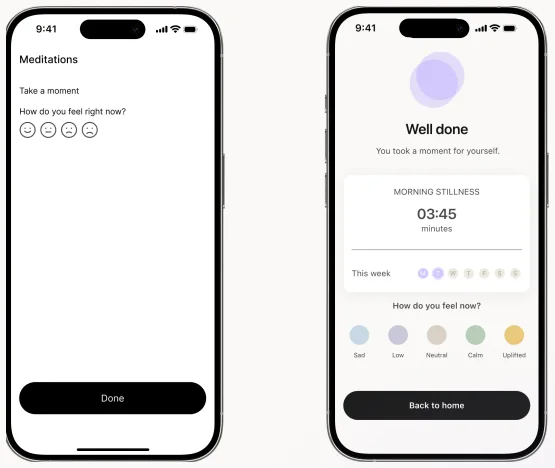
Issue 2 - completion

Sessions ended without any sense of completion.

“Did it just end? I'm not sure if I finished or it cut out.”

Test participant, round 1

The fix: every session now ends on a dedicated completion screen: duration, a gentle “well done”, and a one-tap check-in that closes the loop.

Two phone screens side by side: the abrupt ending before, and the completion screen after.

09 The solution

Sola, in 3 moves.

Every insight from the research, every fix from the testing - resolved into a product that does one thing well: gives an anxious person a calmer minute, fast, and asks for nothing in return.

Move 1 - entry

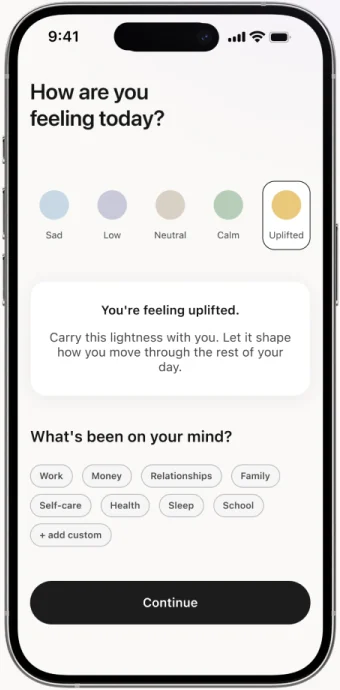
Open the app, answer one question.

No tutorial, no detours. Sola opens with a single mood check-in, and the answer routes straight to a matched practice.

  • Reach a useful screen in under 30 seconds
  • Five mood states, one tap, no judgement
  • The check-in itself is already a moment of pause
The Sola mood check-in screen: five mood states and a single Continue button.

Move 2 - relief

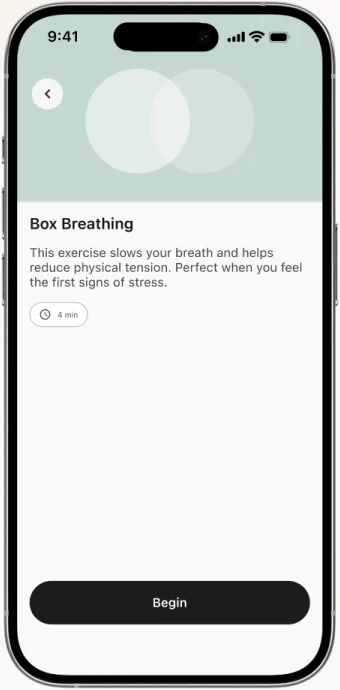
A calm minute, on demand.

Breathing and grounding sit one tap from Home. Free, 1-5 minutes long, and always ending on a real completion screen, so the moment closes properly.

  • Guided visual that paces the breath
  • Soft haptics, no narration unless requested
  • Always ends with stats and a check-in
The Box Breathing screen: a short description and a Begin button.

Move 3 - trust

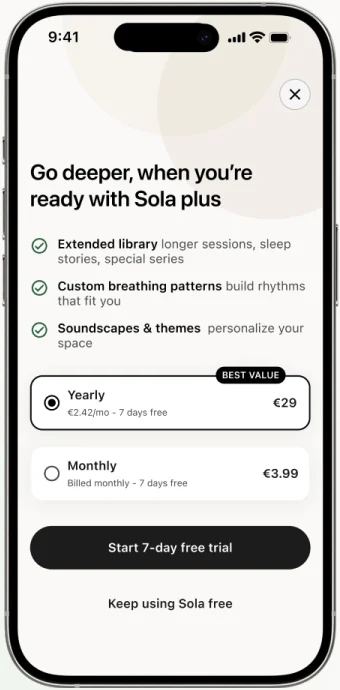
No pressure, ever.

Core features stay free. Reminders read like a friend checking in. No countdowns, no guilt-worded buttons. The app never sells at the moment of need.

  • Free tier covers all daily-use practices
  • Premium adds depth, not access
  • Upgrade prompts appear once, never persistently
The Sola plus screen: what premium adds, the two plans, and a Keep using Sola free link.

10 Design system

The system behind the stillness.

A small, disciplined kit. Few colours, one typeface, a focused set of components - each tied to a real flow. The page you're reading is built from it too.

Colour palette

Three foundation tones do most of the work. Five soft mood accents appear only inside mood components - never as decoration.

  • Breathing#C9E0DD
  • Meditation#BEC8F9
  • Grounding#D6A07C
  • Sleep#113151
  • Sad#C8D8E4
  • Low#C8C8D8
  • Neutral#D8D0C4
  • Calm#B8CDB8
  • Uplifted#E8C87A
  • Background#F6F6F6
  • Card background#FFFFFF
  • Primary text#1C1C1C
  • Secondary text#6B6B6B

Typography

One typeface across the whole product - SF Pro. Native-feeling on every device, legible at every size, quiet enough to never compete with the content.

H128px / Semibold
Find your calm
H220px / Semibold
Breathing exercises
Body16px / Regular
4-7-8 Breathing
Caption12px / Regular
6 minutes · Beginner

Why one typeface

A single family removes visual noise. Sola never asks the eye to switch register - the calm starts with the letterforms.

Grid

Everything sits on an 8-pt spacing grid, sized for iPhone - 393 x 852 pt.

Components

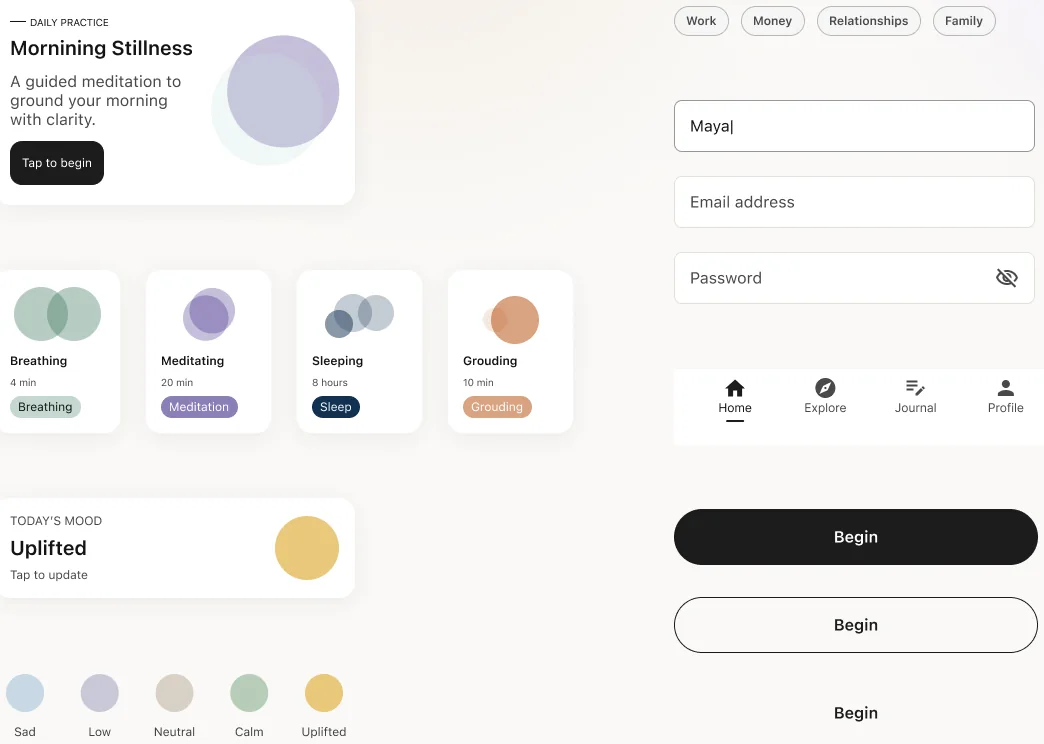
A focused library, built once and used everywhere. Each component maps to a real screen in the flow above.

The Sola component library: practice cards, mood cards, tags, form fields, the tab bar and the button states.

11 Reflection

What I'm taking into the next round.

Sola is still in motion. This section evolves as I run more tests and ship more screens.

  • Step 1

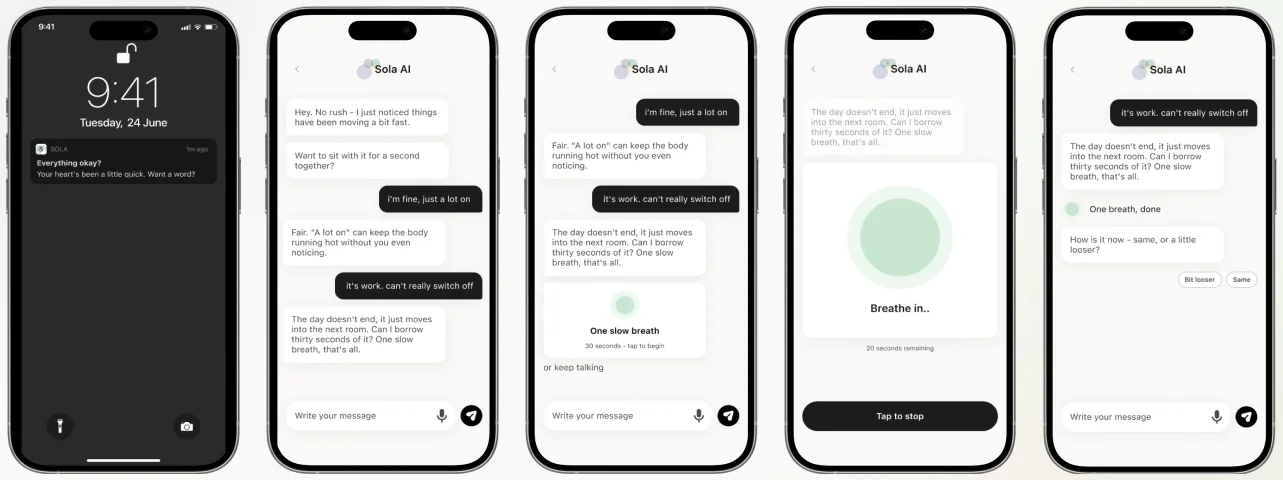
    AI assistant

    A calm layer that reads your Apple Watch heart rate in real time. When it picks up a spike, it nudges you toward a matched breathing or grounding session.

  • Step 2

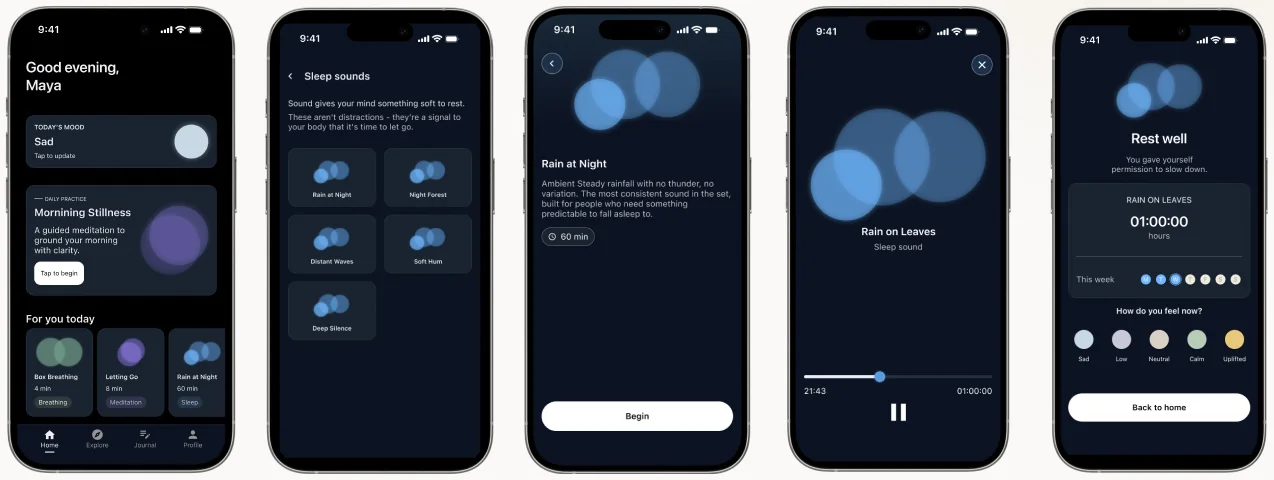
    Dark mode

    A full visual pass for low-light and late-night use. Same warmth, lower contrast, easier on the eyes when sleep is the next step.

  • Step 3

    Vibecoding Sola

    Taking the design from Figma to a working build. Using AI-assisted code to ship a real, testable version of the app.

AI assistant

Five phone screens of the Sola AI assistant, from the watch alert to a guided breath.

Dark mode

Five Sola screens in dark mode: home, sleep sounds, a sound playing, and the closing screen.

The takeaway

Calm isn't a feature you unlock. It's the whole experience.

Sola proves that a wellness app can earn trust by being useful first: leading with free relief, respecting the user's time, and never selling at the moment of need.

Sola

Try it yourself.

The screens above run as a real app in the browser. Open it, or tell me what you would change.